Schema
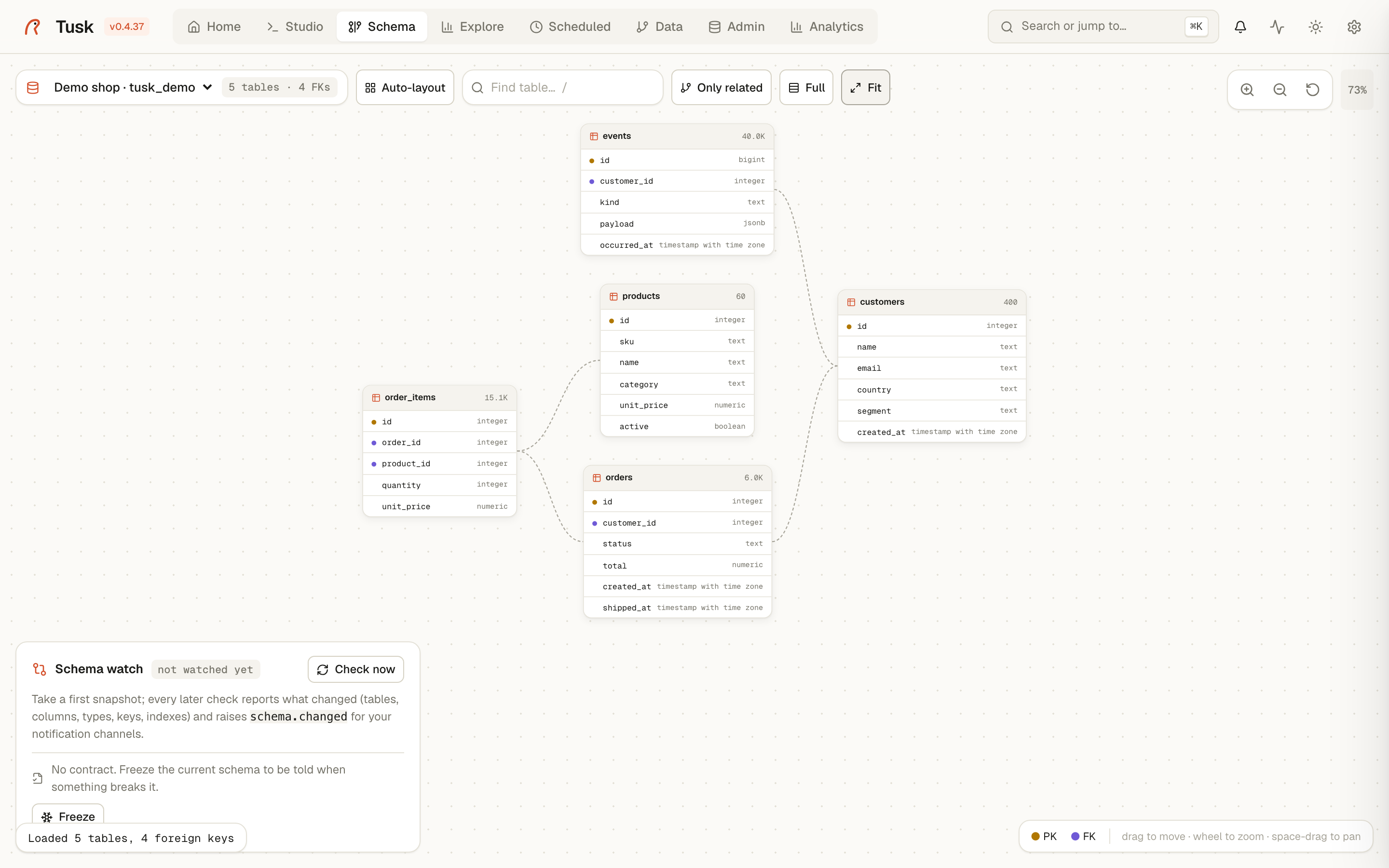
An interactive ER diagram of a PostgreSQL connection. Tables are draggable cards; foreign keys are curved lines between them. The page also hosts Schema Watch and Data Contracts in the bottom-left panel.
What you see
One card per table, listing its columns with their types. An amber dot marks primary-key columns, a violet dot foreign keys. The header shows the estimated row count.
Lines go from the referencing table (right edge) to the referenced one (left edge). Click a table and its neighbours light up while everything else fades; click the background to clear.
Big schemas
Above 25 tables the diagram opens in Compact mode: each card shows only its keys plus a footer such as 17 more columns. Double-click a header (or the footer) to expand that one table; the Compact / Full button switches the whole diagram and re-arranges it.
Tables referenced by a large share of the schema (users, company,
tenant…) get a N refs badge and their lines are hidden at the
overview — they would cross everything and say nothing. Select the hub, or
any table pointing at it, and the lines appear.
When tables share a name prefix (leasing_*, billing_*, Django app
labels, Rails engines), each prefix becomes a labelled block laid out on its
own; otherwise blocks are connected components. Blocks are packed into rows
so the canvas stays roughly screen-shaped.
Finding your way
- Find table (or press
/): type part of a name, pick a match, and the diagram jumps to it, selected and centred. - Group filter: when tables share prefixes, the dropdown shows one entry per group; pick one to see only that group.
- Only related: with a table selected, hides everything else and arranges its neighbourhood as a small diagram of its own. Click another table to move the focus; switch it off to get the full layout back (positions are never saved while it is on).
Toolbar
- Connection picker: switching re-introspects
pg_catalog. - Counter: tables and foreign keys. Above 500 tables the response is capped and a badge says how many are shown.
- Auto-layout: arranges tables by their foreign keys (referencing left, referenced right) using the real card sizes, so cards never overlap. Runs automatically the first time a connection is opened.
- Compact / Full: see above.
- Fit: zooms to show the whole diagram.
Interactions
- Drag a card to move it. Positions are saved on the server per connection and per user, so your arrangement survives reloads and other users keep theirs.
- Wheel zooms around the cursor; Space + drag pans; the buttons at the top-right do the same.
- Click a table to highlight its relations; double-click its header to expand or collapse it in compact mode.
What it isn't
- A migration tool. Nothing here writes to the database.
- A documentation generator. Screenshot it if you need a picture in a wiki; for change tracking use Schema Watch.
Related
- schema-watch.md — snapshots, diffs, notifications.
- data-contracts.md — freeze the shape you depend on.
- explore.md — a single table's data rather than its structure.